> ## Documentation Index
> Fetch the complete documentation index at: https://docs.loqate.com/llms.txt
> Use this file to discover all available pages before exploring further.
# Local API Install Options
Loqate installers are available as multi-thread (`mt`) and single-thread (`st`) engines.
## Available Installers
### Windows x86 and x86\_64
```
loqate_installer_mt_win_x86_vs2005.exe
loqate_installer_mt_win_x64_vs2005.exe
loqate_installer_mt_win_x86_vs2019.exe
loqate_installer_mt_win_x64_vs2019.exe
loqate_installer_mt_win_x64_vs2019_lfs64.exe
```
See [Dependencies](/getting-started/local-api-install-options#dependencies) section for details on installing dependencies from Microsoft.
### Linux x86
```
loqate_installer_mt_linux_x86
loqate_installer_mt_linux_x86-cpp5
loqate_st_installer_x86
loqate_st_installer_x86-cpp5
```
### Linux x86\_64
```
loqate_installer_mt_linux_x86_64
loqate_installer_mt_linux_x86_64-gcc7
loqate_st_installer_x86_64
loqate_st_installer_x86_64-gcc7l
loqate_installer_mt_linux_x86_64-gcc7_lfs64
```
### AIX
```
loqate_installer_mt_aix61
loqate_installer_mt_aix71
loqate_installer_mt_aix72
loqate_st_installer_aix61
loqate_st_installer_aix71
loqate_st_installer_aix72
```
## Dependencies
If using Windows without the correct library dependency installed, you may see the following error message:
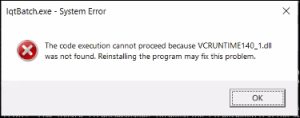 Install the Visual C++ Redistributable package from Microsoft: [Download from Microsoft](https://learn.microsoft.com/en-us/cpp/windows/latest-supported-vc-redist?view=msvc-170#visual-studio-2015-2017-2019-and-2022)
## Customized Installs
Each installer can be customized during installation using a settings file (default: `setup.ini`).
### Settings File Options
All options are optional.
| Option Name | Description | Installation Mode |
| ---------------- | ----------------------------------------------- | ------------------------- |
| `ProductName` | Custom name of product | All modes |
| `ProductVersion` | Custom version name | All modes |
| `ProductLogo` | Full path to custom product logo | GUI mode |
| `ProductIcon` | Full path to custom product icon | Windows install |
| `ShowLicense` | `yes` or `no` | GUI and commandline modes |
| `LicenseFile` | Full path to custom license agreement text file | GUI and commandline modes |
| `InstallDir` | Full path to the installation folder | All modes |
| `Modules` | Modules to install | Silent mode |
| `Samples` | Samples to install | Silent mode |
| `SampleData` | `yes` or `no` | Silent mode |
**Default InstallDir values:**
* Windows: `C:\Loqate\`
* Linux/Unix: `/opt/loqate`
### Settings File Tips
* **Custom License:** Add a license text file, set `LicenseFile` to its location, and set `ShowLicense` to `yes` for graphical and command line installations
* **Custom Logo:** Set `ProductLogo` to add a customized logo to graphical installations
* **Custom Icon:** Set `ProductIcon` in Windows installations to add an icon to start menu shortcuts
* **Modules (silent mode):** Options are `Java`, `.Net`, `Batch`, `Demo`, `InstallManager`, `Node`, `Central`, and `All`. C++ is always installed
* **Samples (silent mode):** Options are `C++`, `Java`, `.Net`, `Batch`, and `All`
* **SampleData (silent mode):** Determines whether sample US data is installed
### Settings File Examples
**Linux GUI/commandline install:**
```ini theme={null}
ProductName=Loqate
ProductVersion=2012Q1
ProductLogo=/home/user/logo.png
ShowLicense=Yes
LicenseFile=/home/user/license.txt
InstallDir=/opt/loqate
```
**Windows GUI install:**
```ini theme={null}
ProductName=Loqate
ProductVersion=2012Q1
ProductLogo=C:\Users\user\logo.png
ProductIcon=C:\Users\user\icon.ico
ShowLicense=Yes
LicenseFile=C:\Users\user\license.txt
InstallDir=C:\Loqate
```
**Linux silent install:**
```ini theme={null}
InstallDir=/opt/loqate
Modules=Java, Batch, InstallManager
Samples=C++, Java, Batch
SampleData=Yes
```
**Windows silent install:**
```ini theme={null}
InstallDir=C:\Loqate
Modules=Java, Batch, InstallManager
Samples=C++, Java, Batch
SampleData=Yes
```
## Installation Modes
The Windows and Linux installers can be run in graphical, console, or silent mode. The settings file is optional in these modes.
The settings file is specified by the `--setup-file` option. If no settings file is specified, the installer will look for a file named `setup.ini` in the same folder as the installer. If no such file exists, the installer will run with no settings file.
### Silent Mode Defaults
Running in silent mode with no settings file will use these default options:
```
InstallDir=C:\Program Files\Loqate (Windows)
InstallDir=/opt/loqate (Linux/Unix)
Modules=all
Samples=all
SampleData=yes
```
### Windows x86
Default mode is graphical.
```bash theme={null}
# Basic graphical installation
loqate_installer_mt_win_x86_vs2005.exe
# With settings file
loqate_installer_mt_win_x86_vs2005.exe --setup-file
# Silent mode
loqate_installer_mt_win_x86_vs2005.exe --mode silent
# Silent mode with settings file
loqate_installer_mt_win_x86_vs2005.exe --mode silent --setup-file
```
### Windows x86\_64
Default mode is graphical.
```bash theme={null}
# Basic graphical installation
loqate_installer_mt_win_x64_vs2005.exe
# With settings file
loqate_installer_mt_win_x64_vs2005.exe --setup-file
# Silent mode
loqate_installer_mt_win_x64_vs2005.exe --mode silent
# Silent mode with settings file
loqate_installer_mt_win_x64_vs2005.exe --mode silent --setup-file
```
### Linux x86
Default mode is console, standard mode is graphical.
```bash theme={null}
# Basic console installation
loqate_installer_mt_linux_x86
# With settings file
loqate_installer_mt_linux_x86 --setup-file
# Graphical mode
loqate_installer_mt_linux_x86 --mode standard
# Graphical mode with settings file
loqate_installer_mt_linux_x86 --mode standard --setup-file
# Silent mode
loqate_installer_mt_linux_x86 --mode silent
# Silent mode with settings file
loqate_installer_mt_linux_x86 --mode silent --setup-file
```
### Linux x86\_64
Default mode is console, standard mode is graphical.
```bash theme={null}
# Basic console installation
loqate_installer_mt_linux_x86_64
# With settings file
loqate_installer_mt_linux_x86_64 --setup-file
# Graphical mode
loqate_installer_mt_linux_x86_64 --mode standard
# Graphical mode with settings file
loqate_installer_mt_linux_x86_64 --mode standard --setup-file
# Silent mode
loqate_installer_mt_linux_x86_64 --mode silent
# Silent mode with settings file
loqate_installer_mt_linux_x86_64 --mode silent --setup-file
```
### AIX
Default mode is console, standard mode is graphical.
```bash theme={null}
# Basic console installation
loqate_installer_
# With settings file
loqate_installer_ --setup-file
# Graphical mode
loqate_installer_ --mode standard
# Graphical mode with settings file
loqate_installer_ --mode standard --setup-file
# Silent mode
loqate_installer_ --mode silent
# Silent mode with settings file
loqate_installer_ --mode silent --setup-file
```
Install the Visual C++ Redistributable package from Microsoft: [Download from Microsoft](https://learn.microsoft.com/en-us/cpp/windows/latest-supported-vc-redist?view=msvc-170#visual-studio-2015-2017-2019-and-2022)
## Customized Installs
Each installer can be customized during installation using a settings file (default: `setup.ini`).
### Settings File Options
All options are optional.
| Option Name | Description | Installation Mode |
| ---------------- | ----------------------------------------------- | ------------------------- |
| `ProductName` | Custom name of product | All modes |
| `ProductVersion` | Custom version name | All modes |
| `ProductLogo` | Full path to custom product logo | GUI mode |
| `ProductIcon` | Full path to custom product icon | Windows install |
| `ShowLicense` | `yes` or `no` | GUI and commandline modes |
| `LicenseFile` | Full path to custom license agreement text file | GUI and commandline modes |
| `InstallDir` | Full path to the installation folder | All modes |
| `Modules` | Modules to install | Silent mode |
| `Samples` | Samples to install | Silent mode |
| `SampleData` | `yes` or `no` | Silent mode |
**Default InstallDir values:**
* Windows: `C:\Loqate\`
* Linux/Unix: `/opt/loqate`
### Settings File Tips
* **Custom License:** Add a license text file, set `LicenseFile` to its location, and set `ShowLicense` to `yes` for graphical and command line installations
* **Custom Logo:** Set `ProductLogo` to add a customized logo to graphical installations
* **Custom Icon:** Set `ProductIcon` in Windows installations to add an icon to start menu shortcuts
* **Modules (silent mode):** Options are `Java`, `.Net`, `Batch`, `Demo`, `InstallManager`, `Node`, `Central`, and `All`. C++ is always installed
* **Samples (silent mode):** Options are `C++`, `Java`, `.Net`, `Batch`, and `All`
* **SampleData (silent mode):** Determines whether sample US data is installed
### Settings File Examples
**Linux GUI/commandline install:**
```ini theme={null}
ProductName=Loqate
ProductVersion=2012Q1
ProductLogo=/home/user/logo.png
ShowLicense=Yes
LicenseFile=/home/user/license.txt
InstallDir=/opt/loqate
```
**Windows GUI install:**
```ini theme={null}
ProductName=Loqate
ProductVersion=2012Q1
ProductLogo=C:\Users\user\logo.png
ProductIcon=C:\Users\user\icon.ico
ShowLicense=Yes
LicenseFile=C:\Users\user\license.txt
InstallDir=C:\Loqate
```
**Linux silent install:**
```ini theme={null}
InstallDir=/opt/loqate
Modules=Java, Batch, InstallManager
Samples=C++, Java, Batch
SampleData=Yes
```
**Windows silent install:**
```ini theme={null}
InstallDir=C:\Loqate
Modules=Java, Batch, InstallManager
Samples=C++, Java, Batch
SampleData=Yes
```
## Installation Modes
The Windows and Linux installers can be run in graphical, console, or silent mode. The settings file is optional in these modes.
The settings file is specified by the `--setup-file` option. If no settings file is specified, the installer will look for a file named `setup.ini` in the same folder as the installer. If no such file exists, the installer will run with no settings file.
### Silent Mode Defaults
Running in silent mode with no settings file will use these default options:
```
InstallDir=C:\Program Files\Loqate (Windows)
InstallDir=/opt/loqate (Linux/Unix)
Modules=all
Samples=all
SampleData=yes
```
### Windows x86
Default mode is graphical.
```bash theme={null}
# Basic graphical installation
loqate_installer_mt_win_x86_vs2005.exe
# With settings file
loqate_installer_mt_win_x86_vs2005.exe --setup-file
# Silent mode
loqate_installer_mt_win_x86_vs2005.exe --mode silent
# Silent mode with settings file
loqate_installer_mt_win_x86_vs2005.exe --mode silent --setup-file
```
### Windows x86\_64
Default mode is graphical.
```bash theme={null}
# Basic graphical installation
loqate_installer_mt_win_x64_vs2005.exe
# With settings file
loqate_installer_mt_win_x64_vs2005.exe --setup-file
# Silent mode
loqate_installer_mt_win_x64_vs2005.exe --mode silent
# Silent mode with settings file
loqate_installer_mt_win_x64_vs2005.exe --mode silent --setup-file
```
### Linux x86
Default mode is console, standard mode is graphical.
```bash theme={null}
# Basic console installation
loqate_installer_mt_linux_x86
# With settings file
loqate_installer_mt_linux_x86 --setup-file
# Graphical mode
loqate_installer_mt_linux_x86 --mode standard
# Graphical mode with settings file
loqate_installer_mt_linux_x86 --mode standard --setup-file
# Silent mode
loqate_installer_mt_linux_x86 --mode silent
# Silent mode with settings file
loqate_installer_mt_linux_x86 --mode silent --setup-file
```
### Linux x86\_64
Default mode is console, standard mode is graphical.
```bash theme={null}
# Basic console installation
loqate_installer_mt_linux_x86_64
# With settings file
loqate_installer_mt_linux_x86_64 --setup-file
# Graphical mode
loqate_installer_mt_linux_x86_64 --mode standard
# Graphical mode with settings file
loqate_installer_mt_linux_x86_64 --mode standard --setup-file
# Silent mode
loqate_installer_mt_linux_x86_64 --mode silent
# Silent mode with settings file
loqate_installer_mt_linux_x86_64 --mode silent --setup-file
```
### AIX
Default mode is console, standard mode is graphical.
```bash theme={null}
# Basic console installation
loqate_installer_
# With settings file
loqate_installer_ --setup-file
# Graphical mode
loqate_installer_ --mode standard
# Graphical mode with settings file
loqate_installer_ --mode standard --setup-file
# Silent mode
loqate_installer_ --mode silent
# Silent mode with settings file
loqate_installer_ --mode silent --setup-file
```