

The Geo+ product combines geocodes, UPRNs and UDPRNs with Royal Mail’s Postal Address File (PAF®) to provide a complete and detailed view of UK locations. This dataset offers roof-top geocodes for GB addresses and at postcode-level for Northern Ireland. It includes:
  • 32m+ records
  • Full UK Matchcode addresses
  • Geocodes accurate to 1m
Plus:
  • Unique Property Reference Number (UPRN) - which remains constant for the entire lifecycle of all buildings in the UK
  • Latitude/Longitude accurate to 1m
  • UDPRN cross-reference from address
  • Eastings & Northings at property level

About This Guide

This guide explains how to access Loqate’s Geo+ web service product using GBG’s Identity Management Platform (IdM), available via SOAP and RESTful web services. The document provides a general description of the available functionality along with a definition of the corresponding interfaces used to access different datasets and services on the IdM platform. The fundamentals of integrating with IdM web services are described on the Integration Fundamentals page and the RESTful services help can be found in the REST Services document Section 2 of this guide gives product-specific details regarding the use of the Matchcode360 Geo+ Web Service products on IdM. The Matchcode Geo+ service provides access to the Geo+ data, in a similar manner to Matchcode UK Address searching (see Matchcode UK Address Integration Guide). All status and error codes from the IdM services can be found in the Error Codes page. The Matchcode Geo+ web service address-search functions are available via the Identity Management ExecuteCapture web service method. Please note: Wherever (LatestWSDLVersion) is shown in Example Code below, please replace this with GlobalServices21a.wsdl.

Loqate Geo+ Data

The address data that underpins the Matchcode360 Geo+ web service is entirely sourced from the Royal Mail’s PAF, Not-Yet-Built and Multiple Residence data files. This provides complete coverage of properties across the UK including England, Scotland, Wales and Northern Ireland. These addresses have been enhanced with UPRN keys and premise-level geo-coordinates (latitude/longitude and Eastings/Northings) from the Ordnance Survey. All data within Geo+ is updated on a monthly basis.

Input Format

Search Criteria

Request Overview

The authenticateUser method (https://idmp.gb.co.uk/idm-core-rest-globalservices/21a/authentication/authenticateUser) should be first be called to generate an authentication token from a username and password. Geo+ address search requests can then be made using the executeCapture method (https://idmp.gb.co.uk/idm-core-rest-globalservices/21a/gbg/executeCapture). For SOAP applications, the authentication token is included in an XML tag within the body of your executeCapture request. For REST/JSON applications, include the authentication token together with your username as a request header. Please see the Integration Fundementals page for full details. In general address searching within the IdM web services can be undertaken using one of three ways:
  • By one or more discrete or ‘atomic’ address elements such as postcode, building number or street name, e.g. “postcode” : “CH4 9GB’”; “building” : “The Foundation”
  • By a partial or full ‘free-format’ or ‘envelope-style’ address entry, e.g. “freeFormatAddress” : “GB Group, Chester, CH4 9GB”
  • By one of several address reference numbers or ‘keys’, e.g. “UPRN” : “1234567890”
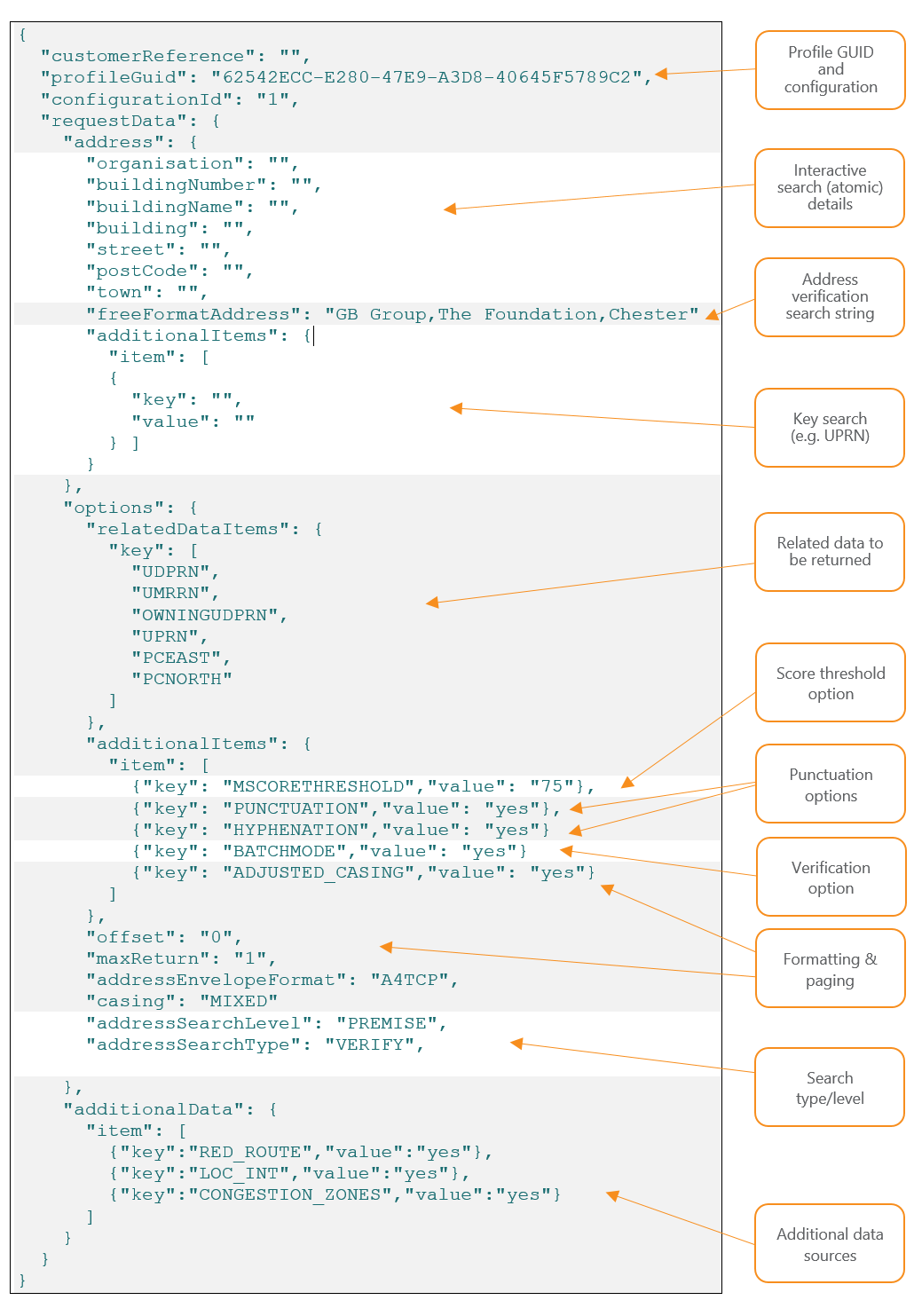
Where the search matches to multiple premise records, (for example when you provide a postcode alone, or a postcode and the name of a building that contains mulitple flats), then the web-service response will contain multiple results. This allows you to build a user-interface than can for example, display a drop-down list of buildings in a postcode, from which a user can select their address. The ‘free-format’ search has some tolerance for mistakes such as ‘typos’, incorrect or missing elements. It will match ‘Top Floor Flat’ to ‘Top Flat’ for example where there is no ambiguity. If the search is too ambiguous or contains too much incorrect data, no results will be returned. The following is a JSON illustration of the components that can be included in the request. Not all elements are required for every request. For example, if you are searching by UPRN, then there is no requirement to enter any address fields. JSON
customerReferenceThis is for your own reference and can be any text string
profileGuidIdentifies the IdM service you are calling. Use

62542ECC-E280-47E9-A3D8-40645F5789C2 for Geo+
configurationIdThe database configuration that has been set up for your use within this profileGUID. For example, for the Geo+ GUID, profile 1 may allow search of Geo+ (standard),

profile 2 may allow access to additional data sets such as Loqate’s Property Intelligence data. Most organisations will have just one profile for their company where configurationId = 1.
requestDataIdentifies the request body
    addressIdentifies the address search details
        organisationThe ‘atomic’ address elements that can be searched. Use for interactive searching only.
        buildingNumber
        buildingName
        building
        street
        postCode
        town
freeFormatAddressComma-separated text string of address ‘lines’ to be searched.
    additionalItems (in Address section)Identifies alternative search items. These are held as key-value pairs and offer an alternative to searching by address. Here you can search on keys such as UPRN and UDPRN. For example

“additionalItems”: {

“item”: [

{“key”: “UPRN”,“value”: “1234567890”}

]

}
OptionsIdentifies search options allowing you to tailor your search and response details
    relatedDataItemsIdentifies the related data or address attributes that you would like returned with your response. These are dependent upon the level of data you have licenced as well as the available fields within the data set you have subscribed to.

If you don’t declare any items or leave this section out, then all available fields will be returned. If you include this section then only the fields you specify will be returned in the response, if available for the addresses matched.

In the example above the following items are specified:

UDPRN: RM Unique Delivery Point Reference Number
UMRRN: RM Unique Multi-Residence Reference Number
OWNINGUDPRN: URPRN of the parent property
UPRN: OS Unique Property Reference Number
PCEAST: Easting of postcode centroid
PCNORTH: Northing of postcode centroid
    additionalItems (in Options)Identifies additional search and response options:

MSCORETHRESHOLD: The matched address will have a score that identifies how much of the input address has been matched to the reference. Note this is not a confidence score but helps in the assessment of matching. MCSCORETHRESHOLD will set the match-score threshold for returned addresses. No addresses under the value specified will be returned. This provide a crude filter of the results. Note that some unambiguous matches may still return low scores (e.g. <60) if the input differs greatly from the matched output, yet there the matched address is without doubt the only possible candidate. This should be used with great care and for most applications should not be specified.

PUNCTUATION: Ensures that correct punctuation is returned in the formatted address response. E.g. “Caberfeidh Hotel, John O’ Groats, WICK”

HYPHENATION: Ensures that the correct hyphenation is returned in the formatted address response. E.g. “33 Ash-Hill Avenue, Aberdeen”

BATCHMODE: Set to YES and set maxReturn to 1, to always return an exact match if one exists on the reference data sets. However, if you want the service to return other potential matches, then set to NO and check the value of totalRecordCount in the response which will then indicate if there are other potential candidates.
    offset & maxReturnThese are paging options mainly used for interactive display of drop-down lists for interactive or address-capture use-cases.

offset is the offset in the list of total matched records

maxReturn is the maximum number of records you’d like returned in the response.

On the first call, you would usually set offset=0 and maxReturn to be your page or drop-down list size e.g. 10.

If the number of records matched (indicated in a response field) is greater than your page size (maxReturn), you could then make a second call if the result the user wants is not in the first page. The second call would set the offset to 10 and maxReturn to 10 in this example.

In a non-interactive, verification use-case, you can set maxReturn=1 to force the service to only return a single record. However, you will need to check the response codes to know if this is the matching record in the list.

You can use this together with the BATCHMODE parameter. This is discussed in detail below.

Note that maxReturn=0 will return ALL records in the ambiguity list if one exists.
addressSearchLevelThis is the level at which you consider a match to be a success. Almost always, this will be set to PREMISE but you may wish to set it to a different value. For address searches, valid options are:

PREMISE
STREET
LOCALITY
POSTCODE
addressSearchTypeTwo types of search are available:

REGISTER: This is used more for browsing, where for example you want to expand a STREET and TOWN combination in the input search fields.
VERIFY: This is used for free-format searching where you want to verify the input details. Always use this when submitting non-interactive, verification requests.
addressEnvelopeFormatMatchcode360 always returns matched addresses in two formats:

Separate address fields (Organisation, Sub-building, Building number, Building name, Street, Sub-locality, Locality, Town and Postcode)

Envelope-format – A text string containing comma-separated address ‘lines’ formatted to a specific style.

The addressEnvelopeFormat key specifies one of a number of fixed structures for the formatted address. Possible values are:

A4P: Four address lines and postcode
A5P: Five address lines and postcode
A6P: Six address lines and postcode
A2TCP: Two address lines, town, county and postcode
A2TCP-B: Two address lines, town, county and postcode without business
A3TCP: Three address lines, town, county and postcode
A3TCP-B: Three address lines, town, county and postcode without business
A4TCP: Four address lines, town, county and postcode
A4P-B: Four address lines without business
A4TCP-B: Four address lines, town, county and postcode without business
A5P-B: Four address lines, town, county and postcode without business
A5P-BC: Four address lines, town and postcode without business or county
PAF: All address elements
    casingSpecifies the casing of the returned formatted address.

One of:

UPPER
LOWER
MIXED
    additionalDataSpecifies a number of key value pairs that govern which aditional datasets this request will search. Note that an appropriate licence must be required for access to these data.

Additional datasets that be subscribed for use with Geo+ include:

key: LOC_INT

  Loqate’s Property Intelligence dataset providing details of a property such as number of bedrooms & bathrooms, building height, burglary rates, distances to roads, water and trees, extensions, council tax bands, roof detail, floor area, planning, sales, estimated value, property type and age

key: CONGESTION_ZONES

  Identifies if the property is within a congestion zone

RED_ROUTE

  Identifies if the property is on a ‘red-route’

Possible values for these keys are

yes: Search the this additional data set

no: Do not search this additional data set (default value if not declared)

Data Structures

The ExecuteCapture method takes in a ExecuteCaptureRequest data structure, which contains all the information neccessary to carry out the request. Type: ExecuteCaptureRequest
Field NameTypeDescription
securityHeaderSecurityHeaderThe username and authentication token used to access the system.
profileRequestProfileRequestCaptureDetails of the request
The SecurityHeader structure holds security data to access products and services in the IdM Platform. The ProfileRequestCapture structure contains the criteria to identify the target product being called and the search data for the product request. Within the profileRequest element, the profileGuid element should contain the GUID value listed below:
ProfileGUID
Matchcode Geo+62542ECC-E280-47E9-A3D8-40645F5789C2
Loqate hosts a number of services on its IdM platform that use the executeCapture URL. The Profile GUID identifies which particular service this request should be directed to. A full list of the Profile GUIDs for all IdM services can be found here. The following JSON request snippet directs the request to the Geo+ service and instructs it to use Configuration ID 2 which may on your organisation’s account for example include a subscription to additional datasets such as the RED ROUTE data over and above the standard Geo+ data.
"customerReference": "Test",
    "profileGuid": "62542ECC-E280-47E9-A3D8-40645F5789C2",
    "configurationId": "2",
The address search criteria should be entered into the IdmDataSearchAddress data structure, which is located within the input details as follows: ExecuteCapture → ProfileRequestCapture → ProfileRequestCaptureData → address The following JSON request snippet will search for the building name “The Foundation” at postcode “CH4 9GB”:
"address": {
            "building": "The Foundation",
            "postCode": "CH4 9GB",
            "freeFormatAddress": "",
            "additionalItems": {}
        },
Full XML and JSON example requests are provided below.

Alternative Search Criteria

Along with the standard address search criteria, this service supports address searching by one of the address identifiers listed below. This search criteria is specified by using the additionalItems property of the search address. To carry out a search with one of these identifiers, a key-value pair must be included in the additional items property, with the key being the identifier and the value being the search value. Only one identifier can be used in a search, if more than one are specified the others will be ignored. This alternative search criteria overrides the standard address search criteria, which will be ignored if a valid identifier is provided in the IDM request.
KeyDescription
UPRNUnique property reference number

This is Ornance Survey’s unique record ID used in its AddressBase data sets

The UPRN is an 12-character numeric value, however when searching, you do not need to left-pad the value with zeros. E.g. both “010012220430” and “10012220430” will match to the same address.
UDPRNRoyal Mail unique delivery point reference number used in its Not-Yet-Built and PAF data. The UDPRN is an 8-character numeric value, however when searching, you do not need to left-pad the value with zeros. E.g. both “00123456” and “123456” will match to the same address.

The UDPRN search key will search for UDPRNs both on the main PAF file and also records on the Not-Yet-Built file.
UMRRNUnique Multiple-Residence Reference Number from the Royal Mail’s Multiple Residence data file.

The UMRRN is an 8-character numeric value, however when searching, you do not need to left-pad the value with zeros. E.g. both “02545399” and “2545399” will match to the same address.
PARENT_UPRNThis searches the Parent Unique Property Reference Number. This is the UPRN of the ‘shell’ or ‘owning’ building of a Multiple Residence flat, unit or apartment. Note that this is inferred from the relationships of an MR with a PAF parent record.

All MR records with the same Parent UPRN value will also share the same Owning UDPRN key

The Parent UPRN is an 12-character numeric value, however when searching, you do not need to left-pad the value with zeros. E.g. both “010003626721” and “10003626721” will match to the address.

Note that an MR record may have its own UPRN as well as an [inferred] Parent UPRN.
OWNINGUDPRNThe Owning UDPRN is the UDPRN of the ‘shell’ or ‘owning’ PAF building record of a MR (flat/unit/apartment). For example, if Ground Floor Flat, Princes House is a Multiple Residence record, then Princes House would be its owning building.

A search on the Owning UDPRN will return all the ‘child’ premises within the parent shell.

However, searching the same value using the UDPRN search key (see above) will return only the address of the shell property. For example searching on UDPRN=02545387 will return 65, Ravensbourne Road. But a search on OWNINGUDPRN=02545387 will return the list of flats within 65 Ravensbourne Road.

The Owning UDPRN is an 8-character numeric value, however when searching, you do not need to left-pad the value with zeros. E.g. both “02545387” and “2545387” will match to the same set of addresses.
For example, the following JSON request snippet will search using the UPRN for GB Group plc.
"address": {
            "building": "",
            "postCode": "",
            "freeFormatAddress": "",
            "additionalItems": {
                "item":[
                    {"key":"UPRN",
                    "value":"010012220430"}
                ]
            }
        },

Additional Request Options

The additional search options, used for configuring options such as casing or transliteration of output results, can be set in the IdmRequestOptions structure located in the ProfileRequestCaptureData.options property.

Additional Return Data

Additional data can be returned, or excluded from being returned, for each address by providing one or more values in the IdmRequestOption.relatedDataItems property. For each value provided, the corresponding additional data is returned, and the corresponding additional data for all the values not provided, are not returned. If you do not explicitly declare any relatedDataItems in your request, then ALL related data items will be returned by default, where they are applicable and/or non-blank for the matched address(es) The following values are supported by this service. Please see the table of related-data fields returned in the response further down, for full details of each data item.
Key MnemonicDescriptionReturned Field Name in Response
COUNTRYCODECountry codecountryCode
UPRNUnique property reference number from Ordnance Surveyuprn
UDPRNRoyal Mail Unique Delivery Point Reference Number from Royal Mail PAF or Not-Yet-Built filermUDPRN
UMRRNUnique Multi Residence Reference Number from the Royal Mail Multiple Residence (MR) fileumrrn
OWNINGUDPRNOwning UDPRN from the MR fileowningUdprn
PARENT_UPRNParent UPRN. Inferred from the MR/PAF property relationshipsparentUprn
X_COORDINATEEastingeasting
Y_COORDINATENorthingnorthing
OS_LATITUDEEastinglatitude
OS_LONGITUDENorthinglongitude
LARGESMALLLarge/Small FlaglargeSmall
SMALLORGFLAGSmall Organisation FlagsmallOrgFlag
UPRN_DERIVATIONUPRN DerivationuprnDerivation
GEO_DERIVATIONGEO DerivationgeoDerivation
RM_AKOKRoyal Mail Address/Organisation KeyrmAkok
NYB_FLAGNot Yet Built FlagnybFlag
Note: A default or requested related-data field is only returned in the response if its value is non-blank. The following JSON request snippet will return the UDPRN, UPRN, latitude, longitude, and the UPRN-derivation and Geo- derivation fields but will not for example, return a NYB Flag or the Large/Small User type flag.
"relatedDataItems": { 
    "key": [ 
        "UDPRN",
        "UPRN", 
        "OS_LATITUDE",
        "OS_LONGITUDE", 
        "UPRN_DERIVATION", 
        "GEO_DERIVATION"
    ] 
},

Request Additional Datasets

Data from additional datasets can be enabled or disabled for an address search, by populating the ProfileRequestCaptureData.additionalData property with key-value pairs from the applicable list table below. To use a particular dataset, the user must be subscribed to the dataset. This information should be entered into the IdmDataArrayAdditionalData data structure, which is located within the input details as follows: ExecuteCapture → ProfileRequestCapture → ProfileRequestCaptureData → additionalData
KeyPossible ValuesDescription
LOC_INT”Yes” or “No”Request Property Intelligence information to be returned
CONGESTION_ZONES”Yes” or “No”Request Congestion Zone information to be returned
RED_ROUTE”Yes” or “No”Request Red Route information to be returned

Property Intelligence/CongestionZone/Red Routes

The Property Intelligence, Congestion Zone and Red Route datasets are detailed here.

Output Format

The results of the Matchcode Geo+ web service search are returned in a ProfileResponseDetails structure with a ProfileResponseDetail.responseType of ‘CAPTURE’. The ProfileResponseDetails structure contains a single CaptureResponse data structure which holds an array of IdmDataAddress records containing the returned address data. ExecuteCaptureResponse > ProfileResponse [0] > ProfileResponseDetails [0] > CaptureResponse > CaptureResponseData > IdmDataAddress [n] Additional data from a search may be returned in the additionalItems or the groupedAdditionalItems of the IdmDataAddress.

Output Fields

Address Fields The service will return the following address fields if a match has been made to the search request data:
Address FieldDescription
organisationThe organisation name is the business name given to a delivery point within a building or small group of buildings. For example: Tourist Information Centre This field could also include entries for churches, public houses and libraries.

Source: Royal Mail
departmentFor some organisations, department name is indicated because mail is received by subdivisions of the main organisation at distinct delivery points. For example:

Organisation Name: ABC Communications

Department Name: Marketing Department

Source: Royal Mail
poBoxPost Office Box (PO Box®) number

Source: Royal Mail
subBuildingThe sub-building name and/or number are identifiers for subdivisions of properties. For example: Sub-building Name: Flat 3 Building Name: Poplar Court. Street: London Road.

NOTE: If the above address is styled 3 Poplar Court, all the text will be shown in the Building Name attribute and the Sub-building Name will be empty. The building number will be shown in this field when it contains a range, decimal or non-numeric character (see Building Number).

Source: Royal Mail
buildingNameThe building name is a description applied to a single building or a small group of buildings, such as Highfield House. This also includes those building numbers that contain non-numeric characters, such as 44A. Some descriptive names, when included with the rest of the address, are sufficient to identify the property uniquely and unambiguously, for example, Magistrates Court. Sometimes the building name will be a blend of distinctive and descriptive naming, for example, Railway Tavern (Public House) or The Court Royal (Hotel).

Source: Royal Mail
buildingNumberThe building number is a number given to a single building or a small group of buildings, thus identifying it from its neighbours, for example, 44. Building numbers that contain a range, decimals or non-numeric characters do not appear in this field but will be found in the buildingName or the sub-BuildingName fields.

Source: Royal Mail
subStreetIn certain places, for example, town centres, there are named streets within other named streets, for example, parades of shops on a high street where different parades have their own identity. For example, Kings Parade, High Street and Queens Parade, High Street.

Source: Royal Mail
streetA street in Geo+ is fundamentally a road, track or named access route on which there are Royal Mail delivery points, for example, High Street.

Source: Royal Mail
subLocalityThis is used to distinguish between similar streets or the same street within a locality.

For example, Millbrook Industrial Estate and Cranford Estate in this situation:

Brunel Way, Millbrook Industrial Estate, Millbrook, Southampton

and

Brunel Way, Cranford Estate, Millbrook, Southampton.

Source: Royal Mail
LocalityLocality areas define an area within a post town. These are only necessary for postal purposes and are often used to aid differentiation where there are streets of the same name in the same locality.

For example, High Street in Shirley and Swaythling in this situation:

High Street, Shirley, SOUTHAMPTON

and

High Street, Swaythling, SOUTHAMPTON.

Source: Royal Mail
townThe town or city in which the Royal Mail sorting office is located which services this record. There may be more than one, possibly several, sorting offices in a town or city.

Source: Royal Mail
postcodeA postcode is an abbreviated form of address made up of combinations of between five and seven alphanumeric characters.

Source: Royal Mail
dpsZipPlusA three-character code uniquely identifying an individual delivery point within a postcode. Comprises a 2-character Delivery Point Suffix code and a check-digit third character

Source: Royal Mail
stateRegionCounty. Within Geo+ the stateRegion field contains the Former Postal County of the PostTown for the address and as such may not always reflect the geographical county (Traditional County) nor the Administrative County. For some addresses, these county names can differ. For example the village of Llanwddyn in Wales has the following:

Former Postal: Shropshire (post town is Oswestry)

Traditional: Montgomeryshire

Administrative: Powys

In the above example, most residents in Llanwddyn would identify their county as “Powys”. However, in Chester, where most residents would identify their county as “Cheshire”, the Administrative County is “Cheshire West and Chester”

Counties have not been required by Royal Mail for approximately two decades and because of the ambiguous nature of county names and the confusion that can be created, Loqate does not recommend the use of counties for UK addressing applications.
If no related data fields are specified in the request, then all the following fields will be returned in the response where they are non-blank for a property address. If specific fields are listed in the relatedDataItems section of the request (using the keys below) then only those fields will be returned if non-blank.
Related Data Item Key to Include in RequestDescriptionLocation in Response
UMRRNUnique Multiple Residence Reference Number. The UMRRN is present for all MR properties and is 8 numeric characters in length, left padded with zeros (e.g. 00321456). The field is not present for PAF or NYB addresses.

Source: Royal Mail Multiple Residence file
IdmDataAddressIdmDataGeoplusInformation → umrrn
OWNINGUDPRNOwning UDPRN. The UDPRN of the ‘shell’ or ‘owning’ PAF building record of a MR (flat/unit/apartment). For example, if Ground Floor Flat, Princes House is a Multiple Residence record, then Princes House would be its owning building

Source: Royal Mail Multiple Residence file
IdmDataAddressIdmDataGeoplusInformation → owningUdprn
PARENT_UPRNParent Unique property reference number. The UPRN of the ‘shell’ or ‘owning’ building of a flat/unit/apartment. Note that this is inferred from the relationships of an MR with a PAF parent record

Source: Loqate Inferred
IdmDataAddressIdmDataGeoplusInformation → parentUprn
LARGESMALL’Large User’ type records (see LARGESMALL above) are all organisations and have their own postcodes. These have a non-zero Address Key but an Organisation Key of 00000000

‘Small User’ type records can be residential or organisation properties. Residential (domestic) properties have a non-zero Address Key and an organisation key of 00000000. Small User organisations have a non-zero Address Key and a non-zero Organisation Key.

This field will return one of the following values:

S: Small User

L: Large User

(blank): MR record, field n/a

Source: Royal Mail PAF
IdmDataAddressIdmDataGeoplusInformation → largeSmall
SMALLORGFLAGFor Small User type PAF records, identifies that this address is an organisation. This record will have largeSmall value of “S”, a non-zero Organisation Key (see RM_AKOK below)

This field will return one of the following values:

Y: The PAF record is a Small User type and is an organisation
IdmDataAddressIdmDataGeoplusInformation → smallOrgFlag
NYB_FLAGThe Not-Yet-Built flag identifies that this address is sourced from the Royal Mail Not-Yet-Built file.

NYB properties are those that have passed through the address naming and numbering scheme, have full postcodes and UDPRN keys yet which have not yet been ‘promoted’ to the main PAF file because they are still in construction and/or are as yet otherwise unoccupied and therefore not in receipt of mail. i.e. They are not current Royal Mail delivery points.
IdmDataAddressIdmDataGeoplusInformation → nybFlag
UPRN_DERIVATIONWithin Locate Geo+, OS UPRNs are appended to the Royal Mail PAF, NYB and MR addresses by a number of different methods. The UPRN Derivation field provides a numerical value that indicates how the UPRN was appended to the address. This can have the following values:

1: Cross-reference of PAF UDPRN to UPRN

2: Cross-reference of NYB UDPRN to UPRN

4: Match of MR address record to OS UPRN address
IdmDataAddressIdmDataGeoplusInformation → uprnDerivation
GEO_DERIVATIONWithin Locate Geo+, geo-coordinates are appended to the Royal Mail PAF, NYB and MR addresses by a number of different methods. The Geo-Derivation field provides a numerical value that indicates how the latitude/longitude and Eastings/Northings values have been appended to the address. This can have the following values:

1: Cross-reference of UDPRN to UPRN geo-codes

4: Match of MR address record to OS UPRN address

5: Geo-coordinates of an MR record have been inferred from its owning PAF (UDPRN) record. The Owning UDPRN record will have a derivation value of 1.

6: Postcode-level geo-coordinates have been sourced from Royal Mail

7: Postcode-level geo-coordinates have been sourced from Ordnance Survey

9: No geo-coordinate data available

Note that records with Geo-Derivation values of 1, 4 and 5 are all at premise-level. Geo-Derivation values of 6 and 7 are at postcode-level. All addresses with values 6 and 7, that are in the same postcode will all have the same postcode-level coordinates.

All and only BT postcode area (Northern Ireland) properties will have a Geo-Derivation value of 6.

Currently, no geo-coordinates are available for addresses in Jersey (JE), Guernsey (GY) or Isle-of-Man (IM). Addresses in these postcode areas will have a geoDerivation value of 9
IdmDataAddressIdmDataGeoplusInformation → geoDerivation
RM_AKOKCombination of the PAF Address Key and Organisation Key. The first 8 characters identify the Royal Mail Address Key and the last 8 characters identify the Royal Mail Organisation Key.

‘Large User’ type records (see LARGESMALL above) are all organisations and have their own postcodes. These have a non-zero Address Key but an Organisation Key of 00000000

‘Small User’ type records can be residential or organisation properties. Residential (domestic) properties have a non-zero Address Key and an organisation key of 00000000. Small User organisations have a non-zero Address Key and a non-zero Organisation Key.

Also see SMALLORGFLAG above
IdmDataAddressIdmDataGeoplusInformation → rmAkok
X_COORDINATEThe National Grid Eastings coordinateIdmDataAddressIdmDataGeographic → easting
Y_COORDINATEThe National Grid Northings coordinateIdmDataAddressIdmDataGeographic → northing
OS_LATITUDEDecimal value of latitudeIdmDataAddressIdmDataGeographic → latitude
OS_LONGITUDEDecimal value of longitudeIdmDataAddressIdmDataGeographic → longitude
UPRNUnique property reference number

This is Ornance Survey’s unique record ID used across its AddressBase data sets. This key is also used within the Local Land and Property Gazetteer of every UK local authority.

The UPRN is currently not available in the Geo+ service for addresses in Guernsey, Jersey, Isle of Man and Northern Ireland

Source: Ordnance Survey
IdmDataAddress → uprn
UDPRNRoyal Mail Unique Delivery Point Reference Number from Royal Mail PAF or Not-Yet-Built file

Source: Royal Mail
IdmDataAddress → rmUDPRN

Example Requests & Responses

The following example show the requests and responses for a simple postcode search ###SOAP Request
<soapenv:Envelope xmlns:soapenv="http://schemas.xmlsoap.org/soap/envelope/" xmlns:b="http://gbworld.gb.co.uk/idm-globalservices/messages/<LatestWSDLVersion>/" xmlns:head="http://gbworld.gb.co.uk/types/header/" xmlns:req="http://gbworld.gb.co.uk/types/core/request/" xmlns:data="http://gbworld.gb.co.uk/types/core/data/">
   <soapenv:Header/>
   <soapenv:Body>
      <b:ExecuteCaptureRequest>
         <b:securityHeader>
            <head:authenticationToken>FFDCEE8B-5623-4A26-A077-606C812CFB6C</head:authenticationToken>
            <head:username>xxxxxx</head:username>
         </b:securityHeader>
         <b:profileRequest>
            <req:customerReference>Test</req:customerReference>
            <req:profileGuid>62542ECC-E280-47E9-A3D8-40645F5789C2</req:profileGuid>
            <req:configurationId>1</req:configurationId>
            <req:requestData>
               <req:address>
                  <data:street/>
                  <data:town/>
                  <data:postCode>ch4 9gb</data:postCode>
                  <data:building/>
                  <data:countryCode>UK</data:countryCode>
                  <data:freeFormatAddress/>
               </req:address>
               <req:filters xsi:nil="true" xmlns:xsi="http://www.w3.org/2001/XMLSchema-instance"/>
               <req:options>
                  <req:addressEnvelopeFormat>A4P</req:addressEnvelopeFormat>
                  <req:offset>0</req:offset>
                  <req:maxReturn>100</req:maxReturn>
                  <req:casing>MIXED</req:casing>
                  <req:transliteration>INPUT</req:transliteration>
               </req:options>
               <req:additionalData></req:additionalData>
            </req:requestData>
         </b:profileRequest>
      </b:ExecuteCaptureRequest>
   </soapenv:Body>
</soapenv:Envelope>

SOAP Response

<SOAP-ENV:Envelope xmlns:SOAP-ENV="http://schemas.xmlsoap.org/soap/envelope/">
   <SOAP-ENV:Header/>
   <SOAP-ENV:Body>
      <mes:ExecuteCaptureResponse xmlns:alu="http://gbworld.gb.co.uk/types/core/request/alu/" xmlns:common="http://gbworld.gb.co.uk/types/common/" xmlns:comp="http://gbworld.gb.co.uk/types/component/" xmlns:data="http://gbworld.gb.co.uk/types/core/data/" xmlns:datatypes="http://gbworld.gb.co.uk/types/datatypes/" xmlns:faults="http://gbworld.gb.co.uk/types/faults/" xmlns:head="http://gbworld.gb.co.uk/types/header/" xmlns:mes="http://gbworld.gb.co.uk/idm-globalservices/messages/<LatestWSDLVersion>/" xmlns:prop="http://gbworld.gb.co.uk/idm-core/component/properties/" xmlns:req="http://gbworld.gb.co.uk/types/core/request/" xmlns:trace="http://gbworld.gb.co.uk/types/core/data/trace/" xmlns:ver="http://gbworld.gb.co.uk/types/core/request/verify/">
         <mes:securityHeader>
            <head:authenticationToken xmlns:xsi="http://www.w3.org/2001/XMLSchema-instance">FFDCEE8B-5623-4A26-A077-606C812CFB6C</head:authenticationToken>
            <head:authenticationTime xmlns:xsi="http://www.w3.org/2001/XMLSchema-instance">2021-02-26T16:40:30.383Z</head:authenticationTime>
            <head:sessionExpiryTime xmlns:xsi="http://www.w3.org/2001/XMLSchema-instance">2021-02-26T17:51:08.234Z</head:sessionExpiryTime>
         </mes:securityHeader>
         <mes:transactionGuid>91EAF017-56A8-4447-8EE4-6FCAD2E60030</mes:transactionGuid>
         <mes:profileResponse>
            <req:profileHeader>
               <req:profileGuid>62542ECC-E280-47E9-A3D8-40645F5789C2</req:profileGuid>
               <req:profileName>Matchcode Geo+</req:profileName>
               <req:transactionGuid>91EAF017-56A8-4447-8EE4-6FCAD2E60030</req:transactionGuid>
               <req:transactionTimeStamp>2021-02-26T16:46:07.339Z</req:transactionTimeStamp>
               <req:profileStatus>SUCCESS</req:profileStatus>
            </req:profileHeader>
            <req:profileResponseDetails>
               <req:transactionGuid>9B532143-33B7-453A-BBFB-55F4968D89F0</req:transactionGuid>
               <req:componentName>GEO+</req:componentName>
               <req:componentStatus>SUCCESS</req:componentStatus>
               <req:componentAction>VERIFY</req:componentAction>
               <req:responseType>CAPTURE</req:responseType>
               <req:notes>[]</req:notes>
               <req:invoice>
                  <req:invoiceList>
                     <req:billingInformationGuid>C0DE0B5D-902A-4CCF-B02C-788659FB1706</req:billingInformationGuid>
                     <req:billingPoints>0</req:billingPoints>
                  </req:invoiceList>
                  <req:invoiceList>
                     <req:invoiceGuid>1AD229CF-B2AD-4511-B893-FC1714151DC8</req:invoiceGuid>
                     <req:billingInformationGuid>2118FFBA-345E-4748-A707-B27EE9A92D38</req:billingInformationGuid>
                     <req:billingPoints>1</req:billingPoints>
                     <req:dataSetInvoices>
                        <req:dataSetCode>GEOPLUS</req:dataSetCode>
                        <req:billingPoints>1</req:billingPoints>
                        <req:recordsReturned>1</req:recordsReturned>
                        <req:dataLicenceGuid>2118FFBA-345E-4748-A707-B27EE9A92D38</req:dataLicenceGuid>
                     </req:dataSetInvoices>
                  </req:invoiceList>
                  <req:invoiceList>
                     <req:billingInformationGuid>8F4C6E8E-32E1-4637-8D70-3E18227908D3</req:billingInformationGuid>
                     <req:billingPoints>0</req:billingPoints>
                  </req:invoiceList>
                  <req:invoiceList>
                     <req:billingInformationGuid>60ACCC30-3914-4C59-8F11-E70E5BAE6C01</req:billingInformationGuid>
                     <req:billingPoints>0</req:billingPoints>
                  </req:invoiceList>
               </req:invoice>
               <req:captureResponse>
                  <req:resultStatus>SINGLE</req:resultStatus>
                  <req:recordsReturned>1</req:recordsReturned>
                  <req:moreData>false</req:moreData>
                  <req:totalRecordCount>1</req:totalRecordCount>
                  <req:totalPages>1</req:totalPages>
                  <req:matchScore>0</req:matchScore>
                  <req:matchLevel>NA</req:matchLevel>
                  <req:outputStatus>NOTMATCHED</req:outputStatus>
                  <req:fieldStatus>55555555</req:fieldStatus>
                  <req:responseCount>1</req:responseCount>
                  <req:response>
                     <req:address>
                        <data:organisation>Gb Group Plc</data:organisation>
                        <data:street>Herons Way</data:street>
                        <data:town>CHESTER</data:town>
                        <data:postCode>CH4 9GB</data:postCode>
                        <data:locality>Chester Business Park</data:locality>
                        <data:buildingName>The Foundation</data:buildingName>
                        <data:stateRegion>Cheshire</data:stateRegion>
                        <data:countryCode>GBR</data:countryCode>
                        <data:formattedAddress>Gb Group Plc,The Foundation,Herons Way Chester Business Park,Chester Cheshire,CH4 9GB</data:formattedAddress>
                        <data:geographicInformation>
                           <data:easting>340009.00</data:easting>
                           <data:northing>363191.00</data:northing>
                           <data:latitude>53.1624611</data:latitude>
                           <data:longitude>-2.8987275</data:longitude>
                        </data:geographicInformation>
                        <data:additionalItems>
                           <data:item>
                              <data:key>DATASOURCE</data:key>
                              <data:value>GEOPLUS</data:value>
                           </data:item>
                        </data:additionalItems>
                        <data:uprn>10012220430</data:uprn>
                        <data:rmUDPRN>04624695</data:rmUDPRN>
                        <data:geoplusInformation>
                           <data:largeSmall>L</data:largeSmall>
                           <data:uprnDerivation>1</data:uprnDerivation>
                           <data:geoDerivation>1</data:geoDerivation>
                           <data:rmAkok>0184754600000000</data:rmAkok>
                        </data:geoplusInformation>
                     </req:address>
                  </req:response>
               </req:captureResponse>
            </req:profileResponseDetails>
         </mes:profileResponse>
      </mes:ExecuteCaptureResponse>
   </SOAP-ENV:Body>
</SOAP-ENV:Envelope><br><br>

JSON (REST) Request

POST https://idmp.gb.co.uk/idm-core-rest-globalservices/21a/gbg/executeCapture HTTP/1.1
Accept-Encoding: gzip,deflate
username: [email protected]
authenticationToken: 3CA978A5-DBEE-418B-A6BB-3401D8D1FFC5
Content-Type: application/json
Content-Length: 478
Host: idmp.gb.co.uk
Connection: Keep-Alive
User-Agent: Apache-HttpClient/4.1.1 (java 1.5)
  
{
  "customerReference": "",
  "profileGuid": "62542ECC-E280-47E9-A3D8-40645F5789C2",
  "configurationId": "1",
  "requestData":
  {
    "address":
    {
      "organisation": "",
      "buildingNumber": "",
      "buildingName": "",
      "building": "",
      "street": "",
      "postCode": "ch4 9gb",
      "town": "",
      "freeFormatAddress": ""
    },
    "options":
    {
      "relatedDataItems":
      {
        "key": [
          "UDPRN",
          "UMRRN",
          "OWNINGUDPRN",
          "UPRN",
          "OS_LATITUDE",
          "OS_LONGITUDE",
          "UPRN_DERIVATION",
          "GEO_DERIVATION"
        ]
      },
      "additionalItems":
      {
        "item": [
          { "key": "PUNCTUATION", "value": "yes"},
          { "key": "HYPHENATION", "value": "yes"}
        ]
      },
      "offset": "0",
      "maxReturn": "100",
      "addressSearchLevel": "PREMISE",
      "addressEnvelopeFormat": "A4TCP",
      "addressSearchType": "VERIFY",
      "casing": "MIXED"
    }
  }
}
The following example show the requests and responses for a UPRN key search

JSON (REST) Request

POST https://idmp.gb.co.uk/idm-core-rest-globalservices/21a/gbg/executeCapture HTTP/1.1
Accept-Encoding: gzip,deflate
username: [email protected]
authenticationToken: 3CA978A5-DBEE-418B-A6BB-3401D8D1FFC5
Content-Type: application/json
Content-Length: 478
Host: idmp.gb.co.uk
Connection: Keep-Alive
User-Agent: Apache-HttpClient/4.1.1 (java 1.5)
  
{
  "customerReference": "",
  "profileGuid": "62542ECC-E280-47E9-A3D8-40645F5789C2",
  "configurationId": "1",
  "requestData":
  {
    "address":
    {
      "organisation": "",
      "buildingNumber": "",
      "buildingName": "",
      "building": "",
      "street": "",
      "postCode": "",
      "town": "",
      "freeFormatAddress": "",
      "additionalItems":
      {
        "item": 
        [
          { "key": "UPRN", "value": "10012220430" }
        ]
      }
    },
    "options":
    {
      "relatedDataItems":
      {
        "key": [
          "UDPRN",
          "UMRRN",
          "OWNINGUDPRN",
          "UPRN",
          "OS_LATITUDE",
          "OS_LONGITUDE",
          "UPRN_DERIVATION",
          "GEO_DERIVATION"
        ]
      },
      "additionalItems":
      {
        "item": [
          { "key": "PUNCTUATION", "value": "yes"},
          { "key": "HYPHENATION", "value": "yes"}
        ]
      },
      "offset": "0",
      "maxReturn": "100",
      "addressSearchLevel": "PREMISE",
      "addressEnvelopeFormat": "A4TCP",
      "addressSearchType": "VERIFY",
      "casing": "MIXED"
    }
  }
}

Error Information

All status and error codes from the IdM services can be found in the Error Codes page.