

IdM Global Services Integration Example Account
Ensure you have an account setup. You will need the Username, Password and WSDL location. If you are unsure of any of the details you can contact the helpdesk for more information on: 01244 657321Importing the Webservice in Visual Studio
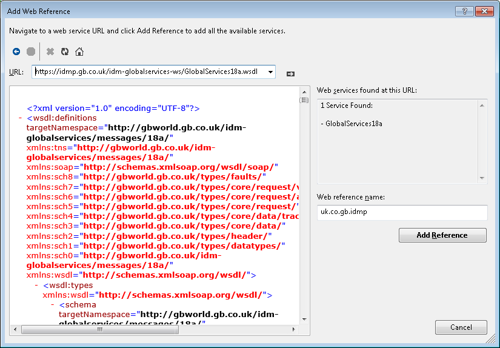
Adding a web reference to visual studio which will create all the webservice objects. It will also set the endpoint so it doesn’t have to be set manually (it is possible to set this manually if required).Visual Studio 2013 Professional Edition (C#)
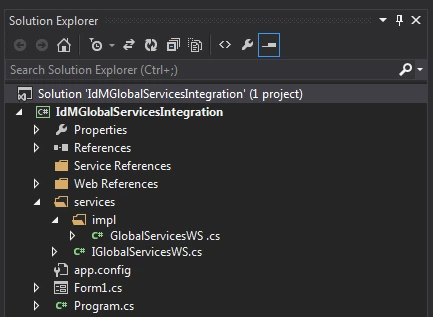
Creating a basic Windows Forms Application (called IdMGlobalServicesIntegration in the examples below). Right-click the project and select Add Service Reference.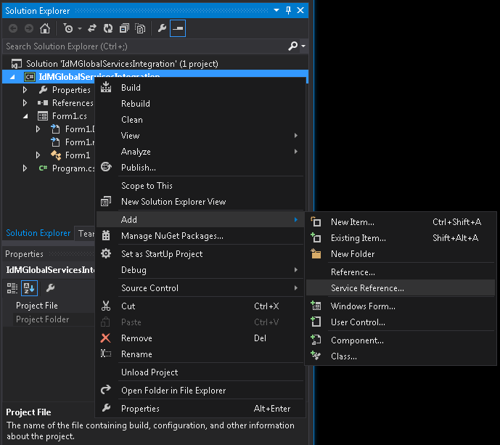
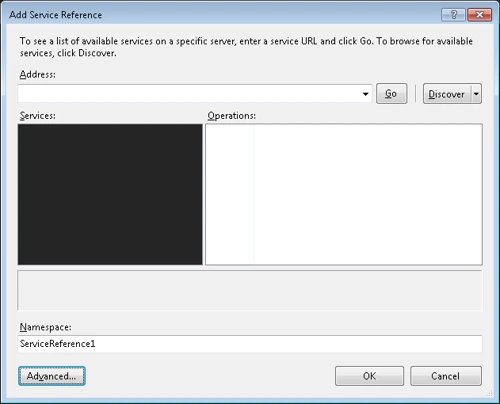
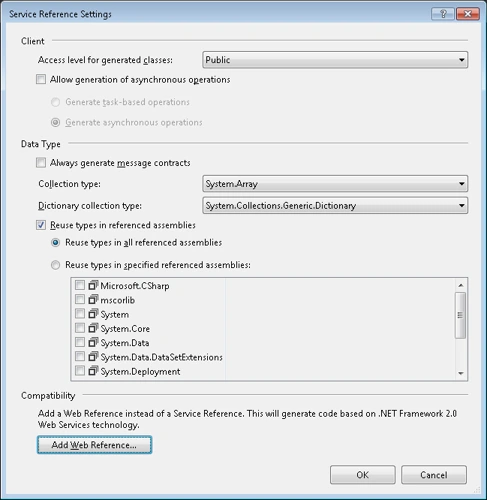
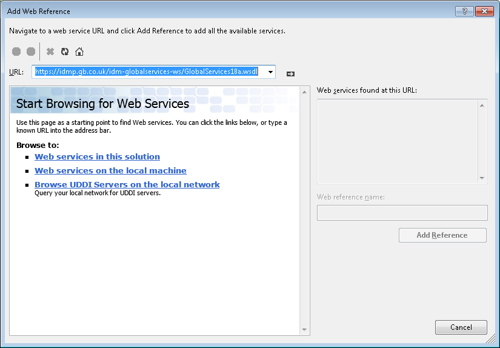
Code C#
Once the webservice has been added to Visual Studio it is now possible to start integrating. The user interface for the final application can be seen below: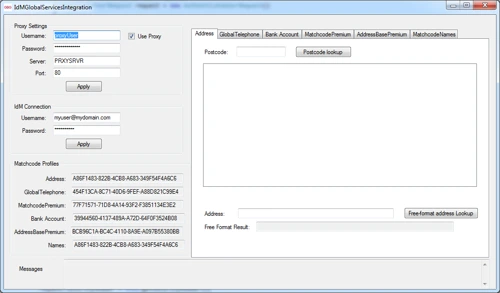
Creating a basic UI
Within the Address tab page, add the following components to your form:| Component Type | Component Name |
|---|---|
| TextBox | txtAddressPostcode |
| Button | btnPostcodeAddressLookup |
| ListBox | lstPostcodeAddressResults |
Creating the Service Layer
The service layer will contain the logic for managing the authentication and calling the web service. Start by creating an interface as shown below:Variables Service Layer Implementation
The following variables are required for configuration. It is good practice to move these configuration variables to an external source instead of hard coding them.Implementing the Postcode Lookup Method
The following function takes a string argument which is the postcode (which is taken from the postcode TextBox added to the form previously).Getting a valid security header
The below functions will authenticate against the web service and setup a valid security header:Postcode Lookup button event
The below method uses the globalService class variable, this needs to be added add GlobalSerivcesWSImpl globalService = new GlobalServicesWSImpl(); to the top of the class. Double clicking the Lookup button on the UI designer will automatically create the Click event for that control. The following code will attempt to execute the lookup() function and catch any errors that may occur (in any subsequent methods).Populating the Addresses ListBox
AddressDisplayPostcodeAddresses() will populate the address listbox with a formatted string for each address. See the following code:Authentication Token Recycling
The above example can be improved by recycling the authentication token. Once authenticated every request afterwards will return a valid authentication token. It is strongly recommended you create a method of using that returned token as to prevent unnecessary calls to the web service. The following interface will handle the refreshing of the authentication token, checking if the authentication is expired (the isValid() method) and holding the current username.Managing Credentials
We can allow the user to set the Username, Password and ProfileGuid by adding more components to the UI. We do not really want to be hard coding the Password into the application for security reasons. We can now add a method to set the security details and re-authenticate when a lookup is executed. We can add another clause to the isValid() method in the AuthenticationDetails so we can change the username and password and invalidate the session forcing the lookup call to re-authenticate with a new username and password. The following properties will allow the Username, Password and ProfileGuid to be updated safely. Whenever the appropriate setter is used, it also callsError Handling
There are many ways of handling errors. This example has a text box it uses primarily for showing errors (which we don’t really cover). You could if you wanted you could just use:Handling a Proxy
Most businesses operate behind a proxy server which in some cases can stop a program from being able to send SOAP requests. This example briefly covers a basic way of handling proxy server authentication you will need some extra components on the UI (unless you want to hard code the proxy details).| Component | Name |
|---|---|
| TextBox | txtProxyUsername |
| TextBox | txtProxyPassword |
| TextBox | txtProxyServer |
| TextBox | txtProxyPort |
| Button | btnProxyApply |
Calling ExecuteCapture
The code snippet method highlights the main tasks to be performed to call the web service. Firstly the code retrieves the security header for the request with a valid authentication token. The code will then call the web service with the request passed into the method. Before passing back the response it will refresh the users authenticationToken for use on the next request.Integrating Telephone
The following sample code shows the additional integration of the Global Telephone service. A second tabPage has been added to the tabControl to organise the simple Telephone lookup. You can get the latest source from the zip file at the bottom of this document. In order to call the Web Service the ExecuteCaptureRequest request object must be created containing the input data for a Mobile and Landline lookup. The table below summarises the objects required:| Object | Description |
|---|---|
| ExecuteCaptureRequest | The top level request object containing the data for the web service method |
| ProfileRequestCapture | Contains the IdM profile data |
| ProfileRequestCaptureData | Contains the input data for both address and telephone data |
List<IdmDataCaptureTelephone> | Contains a list of telephone numbers and their type (LANDLINE, MOBILE, UNKNOWN) |
| IdmRequestOptions | Contains options required for the ALU |
Handling the Web Service Return (ExecuteCaptureResponse) for Telephone lookup
Once you have successfully called the web service and retrieve a valid response you can start to handle the results. The following code provides a high level overview of processing the results:Integrating Bank Account
The following sample code shows the additional integration of the Bank Account validation service. A tab control has been added to the page to organise the simple Bank Account lookup. You can get the latest source from the zip file at the bottom of this document. In order to call the Web Service the ExecuteCaptureRequest request object must be created containing the input data for a Sortcode and Account number lookup. The table below summarises the objects required:| Object | Description |
|---|---|
| ExecuteCaptureRequest | The top level request object containing the data for the web service method |
| ProfileRequestCapture | Contains the IdM profile data |
| ProfileRequestCaptureData | Contains the input data for both address and telephone data |
List<IdMDataCaptureBank> | Contains an array of bank sortcode and account number |
| IdmRequestOptions | Contains options required for the ALU |
Handling the Web Service Return (ExecuteCaptureResponse) for Bank Account lookup
Once you have successfully called the web service and retrieve a valid response you can start to handle the results. The following code provides a high level overview of processing the results:Integrating Matchcode Premium
The following sample code shows the additional integration of the MatchcodePremium service. A tab control has been added to the page to organise the MatchcodePremium lookup. You can get the latest source from the zip file at the bottom of this document. In order to call the Web Service the ExecuteCaptureRequest request object must be created containing the input data for MatchcodePremium lookup. The table below summarises the objects required:| Object | Description |
|---|---|
| ExecuteCaptureRequest | The top level request object containing the data for the web service method |
| ProfileRequestCapture | Contains the IdM profile data |
| ProfileRequestCaptureData | Contains the input data for name, address and email |
| IdmDataCapturePerson | Contains names for a person |
| idmDataArrayOfCapturePerson | Contains an array for persons at an address |
| IdmDataSearchAddress | Contains address (building and postcode) |
List<IdmDataItem> | Contains an array of key/value data items number |
| IdmRequestOptions | Contains options required for the request |
Handling the Web Service Return (ExecuteCaptureResponse) for MatchcodePremium lookup
Once you have successfully called the web service and retrieve a valid response you can start to handle the results. The following code provides a high level overview of processing the results:Parsing Web Service Response
ProfileResponseDisplay is a helper class given as an example as to how to parse the web service response. The class parses the response and returns a set of key value for display in the UI:Integrating AddressBase Premium
The following sample code shows the additional integration of the AddressBase Premium capture service. A tab control has been added to the page to run the simple AddressBase Premium lookup. You can get the latest source from the zip file at the bottom of this document. In order to call the Web Service the ExecuteCaptureRequest request object must be created containing the input data for address lookup. The table below summarises the objects required:| Object | Description |
|---|---|
| ExecuteCaptureRequest | The top level request object containing the data for the web service method |
| ProfileRequestCapture | Contains the IdM profile data |
| ProfileRequestCaptureData | Contains the input data |
| IdmDataSearchAddress | Contains the search address |
| IdmRequestOptions | Contains options required for the request |
Handling the Web Service Return (ExecuteCaptureResponse) for AddressBase Premium lookup
Once you have successfully called the web service and retrieve a valid response you can start to handle the results. The following code provides a high level overview of processing the results:Integrating Matchcode Names
The following sample code shows the additional integration of the Matchcode Names capture service. A tab control has been added to the page to run the simple Matchcode Names lookup. You can get the latest source from the zip file at the bottom of this document. In order to call the Web Service the ExecuteCaptureRequest request object must be created containing the input data for Names lookup. The table below summarises the objects required:| Object | Description |
|---|---|
| ExecuteCaptureRequest | The top level request object containing the data for the web service method |
| ProfileRequestCapture | Contains the IdM profile data |
| ProfileRequestCaptureData | Contains the input data |
| IdmDataSearchAddress | Contains the search address |
| IdmDataCapturePerson | Contains ther person information |
| IdmDataArrayOfCapturePerson | Contains the IdmDataCapturePerson |
| IdmRequestOptions | Contains options required for the request |