

Loqate installers are available as multi-thread (mt) and single-thread (st) engines.

Available Installers

Windows x86 and x86_64

loqate_installer_mt_win_x86_vs2005.exe
loqate_installer_mt_win_x64_vs2005.exe
loqate_installer_mt_win_x86_vs2019.exe
loqate_installer_mt_win_x64_vs2019.exe
loqate_installer_mt_win_x64_vs2019_lfs64.exe
See Dependencies section for details on installing dependencies from Microsoft.

Linux x86

loqate_installer_mt_linux_x86
loqate_installer_mt_linux_x86-cpp5
loqate_st_installer_x86
loqate_st_installer_x86-cpp5

Linux x86_64

loqate_installer_mt_linux_x86_64
loqate_installer_mt_linux_x86_64-gcc7
loqate_st_installer_x86_64
loqate_st_installer_x86_64-gcc7l
loqate_installer_mt_linux_x86_64-gcc7_lfs64

AIX

loqate_installer_mt_aix61
loqate_installer_mt_aix71
loqate_installer_mt_aix72
loqate_st_installer_aix61
loqate_st_installer_aix71
loqate_st_installer_aix72

Dependencies

If using Windows without the correct library dependency installed, you may see the following error message:
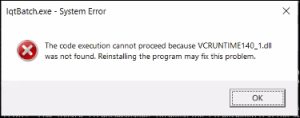
Install the Visual C++ Redistributable package from Microsoft: Download from Microsoft

Customized Installs

Each installer can be customized during installation using a settings file (default: setup.ini).

Settings File Options

All options are optional.
Option NameDescriptionInstallation Mode
ProductNameCustom name of productAll modes
ProductVersionCustom version nameAll modes
ProductLogoFull path to custom product logoGUI mode
ProductIconFull path to custom product iconWindows install
ShowLicenseyes or noGUI and commandline modes
LicenseFileFull path to custom license agreement text fileGUI and commandline modes
InstallDirFull path to the installation folderAll modes
ModulesModules to installSilent mode
SamplesSamples to installSilent mode
SampleDatayes or noSilent mode
Default InstallDir values:
  • Windows: C:\Loqate\
  • Linux/Unix: /opt/loqate

Settings File Tips

  • Custom License: Add a license text file, set LicenseFile to its location, and set ShowLicense to yes for graphical and command line installations
  • Custom Logo: Set ProductLogo to add a customized logo to graphical installations
  • Custom Icon: Set ProductIcon in Windows installations to add an icon to start menu shortcuts
  • Modules (silent mode): Options are Java, .Net, Batch, Demo, InstallManager, Node, Central, and All. C++ is always installed
  • Samples (silent mode): Options are C++, Java, .Net, Batch, and All
  • SampleData (silent mode): Determines whether sample US data is installed

Settings File Examples

Linux GUI/commandline install:
ProductName=Loqate
ProductVersion=2012Q1
ProductLogo=/home/user/logo.png
ShowLicense=Yes
LicenseFile=/home/user/license.txt
InstallDir=/opt/loqate
Windows GUI install:
ProductName=Loqate
ProductVersion=2012Q1
ProductLogo=C:\Users\user\logo.png
ProductIcon=C:\Users\user\icon.ico
ShowLicense=Yes
LicenseFile=C:\Users\user\license.txt
InstallDir=C:\Loqate
Linux silent install:
InstallDir=/opt/loqate
Modules=Java, Batch, InstallManager
Samples=C++, Java, Batch
SampleData=Yes
Windows silent install:
InstallDir=C:\Loqate
Modules=Java, Batch, InstallManager
Samples=C++, Java, Batch
SampleData=Yes

Installation Modes

The Windows and Linux installers can be run in graphical, console, or silent mode. The settings file is optional in these modes. The settings file is specified by the --setup-file option. If no settings file is specified, the installer will look for a file named setup.ini in the same folder as the installer. If no such file exists, the installer will run with no settings file.

Silent Mode Defaults

Running in silent mode with no settings file will use these default options:
InstallDir=C:\Program Files\Loqate (Windows)
InstallDir=/opt/loqate (Linux/Unix)
Modules=all
Samples=all
SampleData=yes

Windows x86

Default mode is graphical.
# Basic graphical installation
loqate_installer_mt_win_x86_vs2005.exe

# With settings file
loqate_installer_mt_win_x86_vs2005.exe --setup-file <full path of settings file>

# Silent mode
loqate_installer_mt_win_x86_vs2005.exe --mode silent

# Silent mode with settings file
loqate_installer_mt_win_x86_vs2005.exe --mode silent --setup-file <full path of settings file>

Windows x86_64

Default mode is graphical.
# Basic graphical installation
loqate_installer_mt_win_x64_vs2005.exe

# With settings file
loqate_installer_mt_win_x64_vs2005.exe --setup-file <full path of settings file>

# Silent mode
loqate_installer_mt_win_x64_vs2005.exe --mode silent

# Silent mode with settings file
loqate_installer_mt_win_x64_vs2005.exe --mode silent --setup-file <full path of settings file>

Linux x86

Default mode is console, standard mode is graphical.
# Basic console installation
loqate_installer_mt_linux_x86

# With settings file
loqate_installer_mt_linux_x86 --setup-file <full path of settings file>

# Graphical mode
loqate_installer_mt_linux_x86 --mode standard

# Graphical mode with settings file
loqate_installer_mt_linux_x86 --mode standard --setup-file <full path of settings file>

# Silent mode
loqate_installer_mt_linux_x86 --mode silent

# Silent mode with settings file
loqate_installer_mt_linux_x86 --mode silent --setup-file <full path of settings file>

Linux x86_64

Default mode is console, standard mode is graphical.
# Basic console installation
loqate_installer_mt_linux_x86_64

# With settings file
loqate_installer_mt_linux_x86_64 --setup-file <full path of settings file>

# Graphical mode
loqate_installer_mt_linux_x86_64 --mode standard

# Graphical mode with settings file
loqate_installer_mt_linux_x86_64 --mode standard --setup-file <full path of settings file>

# Silent mode
loqate_installer_mt_linux_x86_64 --mode silent

# Silent mode with settings file
loqate_installer_mt_linux_x86_64 --mode silent --setup-file <full path of settings file>

AIX

Default mode is console, standard mode is graphical.
# Basic console installation
loqate_installer_<operating_system>

# With settings file
loqate_installer_<operating_system> --setup-file <full path of settings file>

# Graphical mode
loqate_installer_<operating_system> --mode standard

# Graphical mode with settings file
loqate_installer_<operating_system> --mode standard --setup-file <full path of settings file>

# Silent mode
loqate_installer_<operating_system> --mode silent

# Silent mode with settings file
loqate_installer_<operating_system> --mode silent --setup-file <full path of settings file>