

Overview
This tutorial describes a sample Java program which uses Loqate Local API to process an input text file containing multiple international addresses. The program writes all Loqate output results to an output file.Assumptions
It is assumed that the following software is installed in the user’s system:- Eclipse IDE for Java Developers, or similar Java IDE
- Java SE Development Kit 7 update 3
Eclipse Configuration
In order to access the Loqate engine from Java using Eclipse, the user must add the Loqate library jar file to the Eclipse’s Java build path. This can be easily done in Eclipse following these steps:- Open Eclipse. Create a new project or select the existent project that will use the Loqate engine.
- Select “Project” → “Properties”. Then select “Java Build Path” from the options shown on the left panel. The Properties panel will look similar to the panel shown in the figure below.
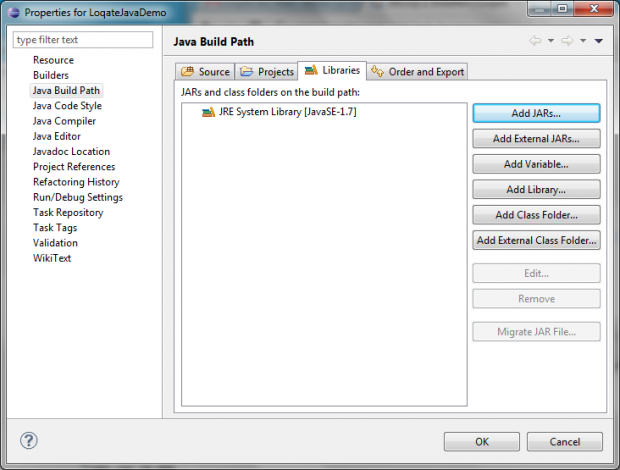
Eclipse Project Java Build Path
- Please click on the “Add External JARs…” button. The “JAR Selection” panel will open. Browse to the Loqate installation directory and select the
loqate.jarfile (e.g.,C:\Program Files\Loqate\loqate.jar). Click on the “Open” button. The Properties panel will look as shown in the figure below. Notice that theloqate.jarfile has been added to the Libraries in the Java build path. Click “Ok”. The Properties window will close.
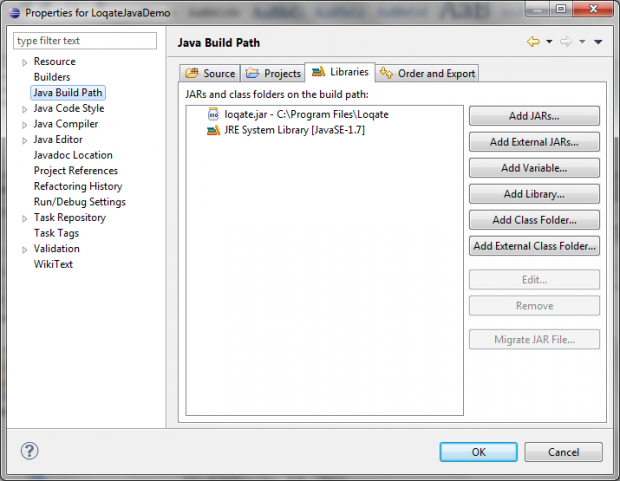
Adding the Loqate library to the Java Build Path
Sample Program
A sample program is provided to illustrate how to communicate with the Loqate’s Local API using Java. The program reads an input file that includes multiple addresses, loads the information into the Loqate Server which is then used to process those addresses. The results obtained are then written to an output file.File Input
In the sample program, the input data is read from a text file in UTF-8 format (LoqateTestData100.txt). The input file is expected to include multiple addresses (records), including one address per line. Each address includes up to six fields (Address1, Address2, Locality, AdministrativeArea, PostalCode and Country) which are separated by tabs. More fields can be also used.
The sample program reads that input file using Java’s java.io.FileReader and java.io.BufferedReader.
BufferedReader.readLine() is used to read the input file one line at the time. The String.split() method is used to store each address field in a different cell of the array called splitArray. This array is later used to set the values for each Loqate record.
The figure below shows the top section of the input file used.
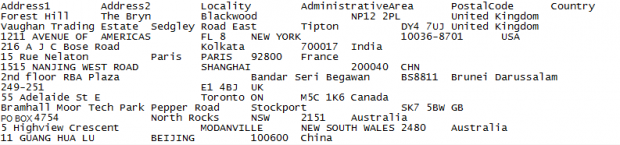
Input Sample File
Loqate’s Local API
The sample Java program shows how the input data can be processed by the Loqate Engine using Loqate’s Local API. The overall process can be grouped in three categories as follows:1. Loqate Server Set Up
This category includes:- Load the Loqate library
- Create the Loqate server
- Initialize the server instance
- Create the Loqate process list
- Create the Loqate process options
- Open a session to the Loqate server
2. Loqate Record Processing
This category includes the following steps:- Create a Loqate input record (or multiple records)
- Create a Loqate Process Result object (or multiple objects) for those input records
- Process the Loqate input record
3. Loqate Server Teardown
- Remove the Loqate Input Record(s)
- Remove the Loqate Process Result(s)
- Close Loqate Server Session
- Remove the Loqate Process list
- Remove the Loqate Process options
- Stop and delete the Loqate server
import com.loqate.* statement at the top of the Java program, together with any other import statements.
Loqate Server Setup
Load the Loqate library
This step is done in the sample code by the following call:lqtjava is the name of the executable jar library included in the <Loqate installation path>/Loqate directory.
Create and Initialize the Loqate server
In the sample code, the Loqate server is created with the following call to the Loqate API:/data directory. In the sample code this is done as follows:
C:\Program Files\Loqate\data directory, which is the default installation path.
Alternatively the user can provide the GKR directory path as an argument to the sample program.
Create the Process List
In the sample program, the Loqate process list is created with the following Java call:lqtProcessOptions, as described in the next section.
Create and Define Process Options
The Loqate process options object is created with the following Java call:lqtProcessList) and process options (lqtProcessOptions) can be used to determine which Loqate engine operations are desired to run. The current available process operations are:
- Parse
- Format
- Geocode
- Match
- Query
- Search
- Verify
opts) to the process list (lst).
Start the Loqate Server Session
A call toopen() on the lqtServer object creates a Loqate server session and returns the session ID. This is done in the sample program with the following statement:
srv is an instance of the lqtServer.
Starting the Loqate server session concludes the Loqate server startup section. At this point the sample application is ready to process the input data file.
Loqate Record Processing
The input data file may include multiple international addresses. Every address will be considered a separate record. The following sections illustrate how to process every individual record.Create a Loqate Input Record
A Loqate input record must be created for each separate record of the given input file. In the sample code, an instance of the record object is created with the following statement:lqtInputRecord.set(<record field name>, <field value>). In the sample program the field values are read from a String array, as follows:
splitArray, namely splitArray[0].
Create a Loqate Process Result
A Loqate Process Result object is created in the sample program using the following statement:lqtProcessResult object is created for every input record.
Process the Record
To process an individual record, the program must simply call theprocess(…) method on an instance of the lqtServer Loqate server. As shown in the sample program, the process method must be provided three arguments:
srvis an instance oflqtServer, the Loqate serverrecis an instance oflqtInputRecord, the Loqate input recordlstis an instance oflqtProcessList, the Loqate process listresis an instance oflqtProcessResult, the Loqate process result
lqtServer, the process(…) method performs the supplied lqtProcessList on the supplied lqtInputRecord, returning the results in the supplied lqtProcessResult.
Loqate Server Teardown
In this section the program proceeds to free up those resources used earlier in the Loqate Server Setup and Loqate Record processing stages.Remove Loqate Input Record
This is achieved by invoking the methodlqtInputRecord.destroy(…). A reference to the input record that needs to be destroyed should be passed as an argument. In the sample program this is achieved in the following statement:
rec is an instance of the lqtInputRecord.
In the sample program each record is destroyed after being used.
Remove Loqate Process Result
The Loqate Process Result object can be deleted invoking the methodlqtProcessResult.destroy(…), as seen in the sample program:
res is an instance of the lqtProcessResult.
In the sample program each process result is destroyed after being used.
Close Loqate Server Session
The Loqate Server Session is closed usinglqtServer.close(…) method, which accepts as an argument the session id that was returned by lqtServer.open(). In the sample program this is achieved as follows:
srv is an instance of lqtServer and session is the session id that was returned when starting the Loqate server session.
Remove the Loqate Process List
The Loqate Process List can be removed by invokinglqtProcessList.destroy(…). In the sample program this is done as follows:
lst is an instance of the lqtProcessList.
Remove the Loqate Process Options
The Loqate Process Options can be removed by invokinglqtProcessOptions.destroy(…). In the sample program this is done as follows:
opts is an instance of the lqtProcessOptions.
Stop and Delete the Loqate Server
Two additional calls are needed before the application terminates:lqtServer.shutdown() and lqtServer.destroy(srv).
The first one stops the Loqate server:
srv is an instance of the lqtServer.
Output File
The sample program prints all the Loqate results to an output file (LoqateTestData100.out). Those results are printed to file in the sample program using Java’s java.io.FileWriter and java.io.PrintWriter.
The figure below displays results for two records as they are seen in the resulting output file. It can be observed the results provided by the Loqate engine includes new fields which were not available in the input file, such as DependentLocality, SuperAdministrativeArea, PostalCode, Latitude, Longitude, GeoAccuracy and Address. That additional result information is produced for each address by the Loqate engine after querying the Loqate GKR.
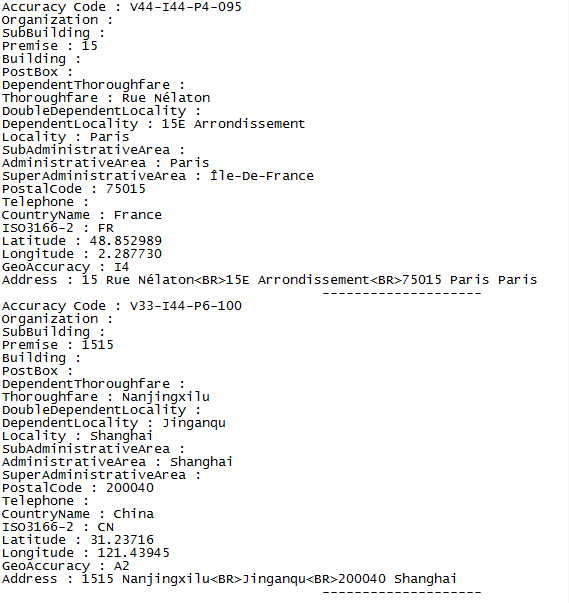
Sample Output File
Result Verification
The results of the sample program can be verified against the results obtained using the Loqate Demonstration GUI. Either approach must provide the same results. The Demonstration GUI can be launched in Windows selecting “Start” → “All Programs” →“Loqate” →“Loqate”.Sample Code
The complete code for the sample Java program,LoqateJavaDemo.java, is shown below in Listing 1.